

Let’s be honest, no one became an instructional designer to rewrite compliance modules forever. You became one to solve problems, tell stories, and make learning actually stick.
AI won’t replace that creative magic, but it can help you get there faster. It can brainstorm formats, summarize long SME interviews, and even draft a quiz before your coffee cools. Think of it as your always-on creative assistant, one that never needs caffeine but still benefits from your direction.
Right now, AI is transforming how content is built, refined, and personalized. But before you plug it into your next project, there’s one golden rule: confidentiality first, creativity second.
The State of AI in Learning and Development
If it feels like everyone is testing AI right now, you’re right!
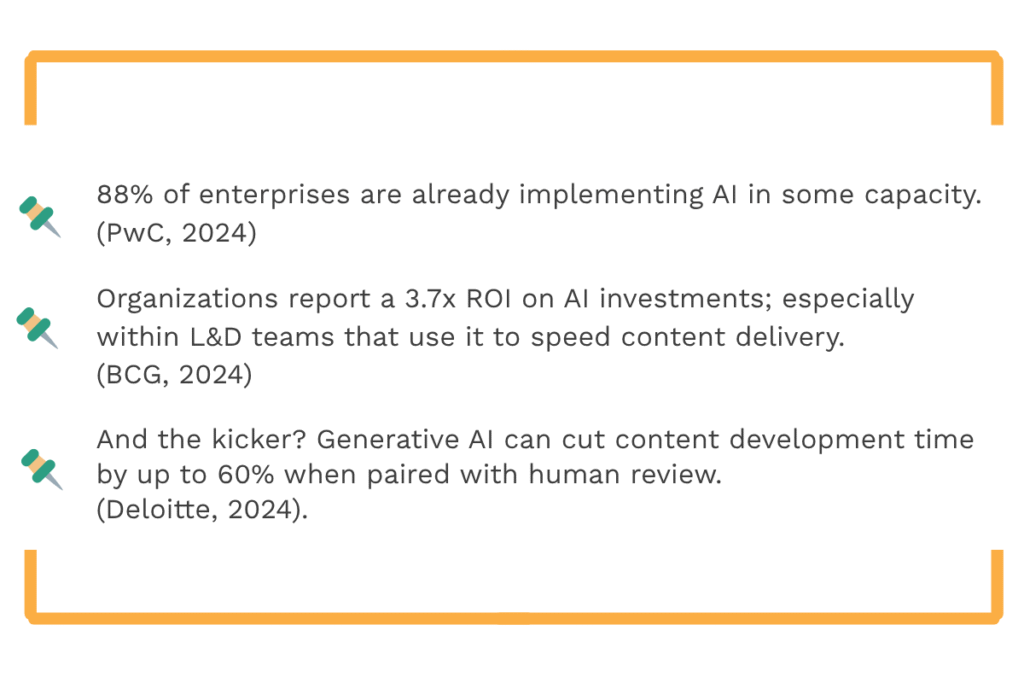
So, if you’re still on the fence, consider this your sign: AI is no longer the future of learning, it’s the workflow accelerator of today.
Confidentiality Comes First: Protecting What Matters
As a learning professional, you handle more than just content, you handle context. Internal strategies, learner data, and client materials aren’t meant for public models.
Feeding those into open tools like ChatGPT, Gemini, or Claude is like leaving your project folder in an airport lounge.
Smart, Safe Practices for Instructional Designers:
- Use enterprise-secure AI tools (e.g., Microsoft Copilot, private GPTs, or company-approved platforms).
- When experimenting, replace real names and data with placeholders.
- Never upload proprietary content, transcripts, or policies into public tools.
- Know your companies stance AI ethics and data handling, just like any other compliance requirement.
Think of it this way:
You wouldn’t share your company’s internal documents on a public site. Approach AI tools the same way; use them wisely and keep private information private.
AI Fluency: What Instructional Designers Really Need to Know
Being “AI-fluent” doesn’t mean you can build your own chatbot. It means you understand how to guide one.
AI in Learning and Development works best when you treat it like a junior designer—eager, fast, and full of ideas, but needing your expertise to stay aligned.
Here’s what fluency really looks like:
- You know what AI tools can and can’t do.
- You can spot when content sounds too “AI-ish.”
- You give AI strong prompts—like creative briefs instead of vague requests.
Try These Prompts:
“Write a three-scene eLearning storyboard that teaches emotional intelligence through storytelling.”
“Summarize this SME transcript into 3 key learner takeaways and suggest 2 microlearning formats.”
A clear prompt equals a cleaner output. That’s AI fluency in action.
Human + AI Collaboration: The Real Magic
AI can brainstorm faster than any of us, but it can’t connect the dots the way a human designer can.
Imagine this workflow:
- Your SME shares a 20-minute interview.
- An AI transcription tool (like Otter or Fathom) captures it instantly.
- You prompt: “Summarize this transcript and identify 3 potential training gaps.”
- The AI returns the key takeaways in seconds, while you’re already sketching learning objectives.
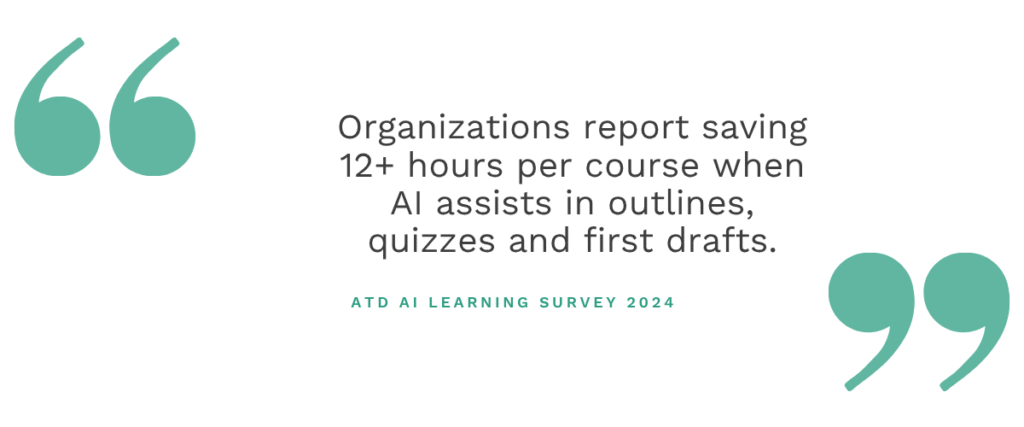
Result: You just saved hours and kept your creative energy where it matters—on learner experience.
Treat AI as a partner, not a replacement. You bring empathy, context, and storytelling that make learning unforgettable.
AI-Powered ADDIE: Your Workflow on Turbo
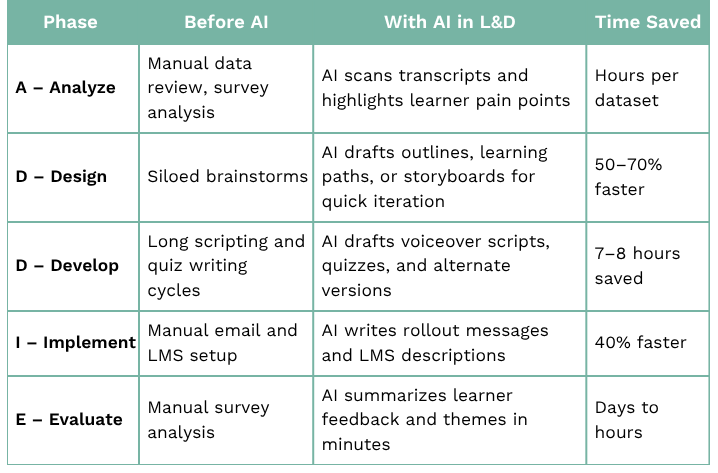
AI doesn’t replace ADDIE; it supercharges it.
Here’s how instructional designers are blending AI and ADDIE to design smarter, faster, and safer:
Pro Tip:
Let AI handle the heavy lifting: transcribing, summarizing, drafting, and pattern-spotting, so you can focus on alignment, creativity, and the learner journey.
Where to Start: Your AI-in-L&D Checklist
- Identify 1–2 repetitive tasks you can test with AI.
- Explore enterprise-safe tools your organization supports.
- Build a small “AI pilot project” to showcase results.
- Train your team on ethical AI usage and prompt best practices.
Remember, every minute saved on admin is a minute you get back for design.
You’re Not Being Replaced—You’re Being Reimagined
AI isn’t taking your job; it’s taking your busy work.
The best instructional designers aren’t afraid of change, they direct it.
They’re using AI to speed up production, free up mental space, and deliver more creative, human-centered learning experiences.
Your mission: be the architect, not the assistant.
Model curiosity. Protect data. Pair human intuition with AI precision.
That’s how L&D becomes future-ready.
It’s time to take off.
Supercharge your next course with AI-driven creativity and strategy.
Download 50 Powerful and Innovative AI Prompts for L&D and see how top instructional designers are saving hours, boosting engagement, and reimagining what’s possible — safely.